 Sensors
Beginner
Sensors
Beginner
Working with RFID RC522 Module
Published on Jan 02, 2026
Sensors
Beginner
Published on Jan 02, 2026
The RFID RC522 is a low-cost, high-performance module used for reading and writing RFID tags. This tutorial will guide you on how to interface the RC522 module with Arduino and perform basic authentication and tag reading.
Arduino Uno
RFID RC522 Module
RFID Keycards or Tags
Jumper Wires
Breadboard
The RC522 module communicates with Arduino using the SPI interface. When a card or tag is presented near the reader, the module reads the unique ID (UID) and sends it to Arduino for verification or processing.
Typical workflow:
Arduino sends a request to the RC522 module
RC522 detects a tag within its field
Module reads the UID of the tag
Arduino processes the UID for authentication or actions
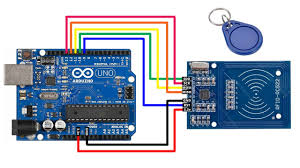
SDA → Pin 10
SCK → Pin 13
MOSI → Pin 11
MISO → Pin 12
IRQ → Not connected
GND → GND
RST → Pin 9
3.3V → 3.3V
Access Control Systems
Attendance Systems
Security and Authentication Projects
IoT-enabled Identification Solutions
This setup can be extended to control relays, log attendance, or integrate with databases for advanced RFID-based systems.
Code Example
#include <SPI.h>
#include <MFRC522.h>

#define SS_PIN 10
#define RST_PIN 9

MFRC522 mfrc522(SS_PIN, RST_PIN);

void setup() {
  Serial.begin(9600);
  SPI.begin();
  mfrc522.PCD_Init();
  Serial.println("RFID reader initialized");
}

void loop() {
  if (!mfrc522.PICC_IsNewCardPresent()) return;
  if (!mfrc522.PICC_ReadCardSerial()) return;

  Serial.print("Card UID: ");
  for (byte i = 0; i < mfrc522.uid.size; i++) {
    Serial.print(mfrc522.uid.uidByte[i] < 0x10 ? "0" : "");
    Serial.print(mfrc522.uid.uidByte[i], HEX);
    Serial.print(" ");
  }
  Serial.println();

  mfrc522.PICC_HaltA();
}