 Robotics
Beginner
Robotics
Beginner
Build a Line Following Robot
Published on Jan 02, 2026
Robotics
Beginner
Published on Jan 02, 2026
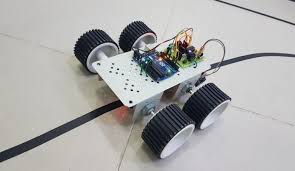
A line following robot is an autonomous mobile robot designed to detect and follow a visible path, usually a black line on a white surface. This project introduces the fundamentals of robotics, sensor-based decision making, and motor control using a microcontroller.
Arduino Uno
IR Line Sensor Module (2 sensors or array)
L298N Motor Driver Module
DC Motors with Wheels
Robot Chassis
Battery Pack
Jumper Wires
Breadboard (optional)
The robot uses infrared (IR) sensors to detect the contrast between the line and the surface. Each sensor outputs a digital signal depending on whether it detects the line.
When both sensors detect the line, the robot moves forward
When the left sensor detects the line, the robot turns left
When the right sensor detects the line, the robot turns right
When no sensor detects the line, the robot stops or searches for the line
The Arduino processes sensor data and sends control signals to the motor driver, which drives the motors accordingly.
Left IR Sensor OUT → Arduino Digital Pin 2
Right IR Sensor OUT → Arduino Digital Pin 3
VCC → 5V
GND → GND
IN1 → Arduino Pin 8
IN2 → Arduino Pin 9
IN3 → Arduino Pin 10
IN4 → Arduino Pin 11
ENA & ENB → Jumper Enabled or PWM Pins
Motor terminals → DC Motors
Power input → External Battery
Robotics Learning & Competitions
Industrial Automation Concepts
Autonomous Vehicle Basics
Academic and Training Projects
This project can be extended using PID control, speed sensors, obstacle detection, or wireless monitoring.
Code Example
#define LEFT_SENSOR 2
#define RIGHT_SENSOR 3

#define IN1 8
#define IN2 9
#define IN3 10
#define IN4 11

void setup() {
  pinMode(LEFT_SENSOR, INPUT);
  pinMode(RIGHT_SENSOR, INPUT);

  pinMode(IN1, OUTPUT);
  pinMode(IN2, OUTPUT);
  pinMode(IN3, OUTPUT);
  pinMode(IN4, OUTPUT);
}

void loop() {
  int leftValue = digitalRead(LEFT_SENSOR);
  int rightValue = digitalRead(RIGHT_SENSOR);

  if (leftValue == LOW && rightValue == LOW) {
    moveForward();
  }
  else if (leftValue == LOW && rightValue == HIGH) {
    turnLeft();
  }
  else if (leftValue == HIGH && rightValue == LOW) {
    turnRight();
  }
  else {
    stopRobot();
  }
}

void moveForward() {
  digitalWrite(IN1, HIGH);
  digitalWrite(IN2, LOW);
  digitalWrite(IN3, HIGH);
  digitalWrite(IN4, LOW);
}

void turnLeft() {
  digitalWrite(IN1, LOW);
  digitalWrite(IN2, LOW);
  digitalWrite(IN3, HIGH);
  digitalWrite(IN4, LOW);
}

void turnRight() {
  digitalWrite(IN1, HIGH);
  digitalWrite(IN2, LOW);
  digitalWrite(IN3, LOW);
  digitalWrite(IN4, LOW);
}

void stopRobot() {
  digitalWrite(IN1, LOW);
  digitalWrite(IN2, LOW);
  digitalWrite(IN3, LOW);
  digitalWrite(IN4, LOW);
}
Build a smart robot that navigates around obstacles using ultrasonic sensors. Perfect introduction to autonomous robotics.
Read Tutorial